The first time I stared at a DNS panel I understood nothing on the screen, and the getting started guide I wrote on this blog compressed that whole evening into one sentence, buy a domain and point it at your server, which is the kind of sentence that hides an hour of confusion behind four words. A friend hit the same wall last month and sent me a screenshot of a DNS dashboard with the question that started all of this for me too, what do I actually put in here, and this post is the answer I wish had existed, because DNS is the one piece of knowledge that every single thing you self-host stands on, and it is smaller than it looks.
Start with what you are buying, because a domain is a rental, you pay annually for the right to be called yourdomain.com, and the registrar is just the shop, so pick one with honest pricing and no upsell maze, Cloudflare or Porkbun or Namecheap are the ones I point people to, and skip everything in the checkout except the domain itself, you do not need their email and you do not need their website builder, you need the name and nothing else. The domain itself does nothing, it is a name waiting for directions, and the directions live in DNS, the domain name system, which is the internet’s phone book, a global distributed database that answers one question billions of times a second, what is the address of this name.
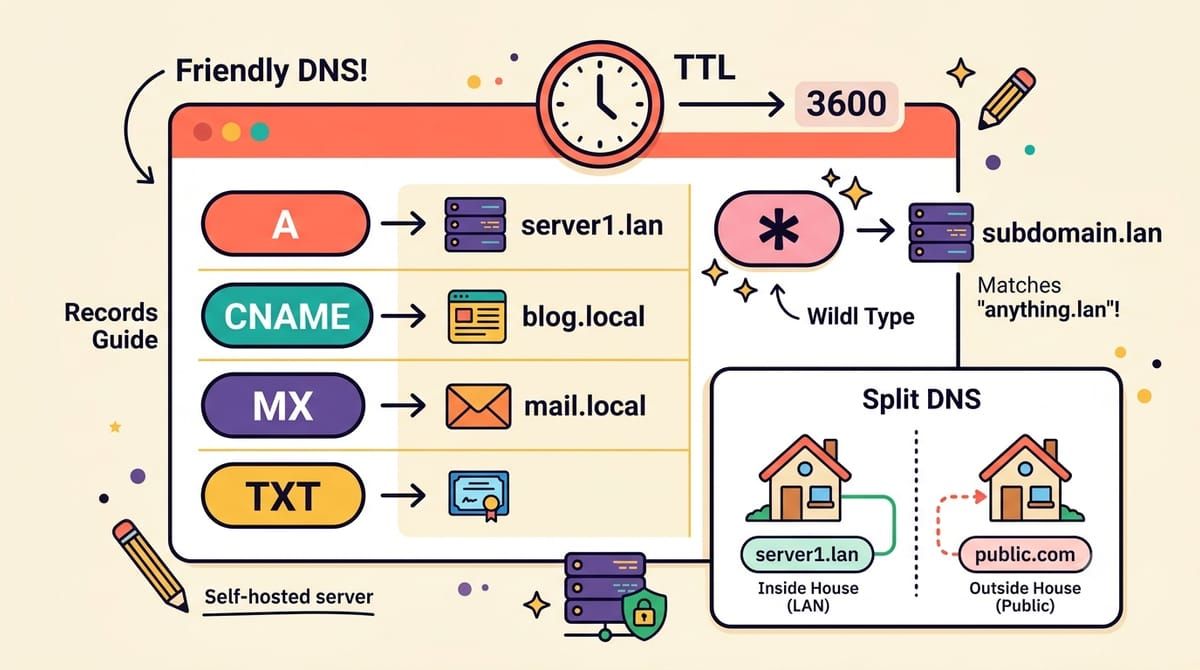
Records are the answer format, and five of them cover everything a self-hoster will ever do. The A record is the fundamental one, it says this name lives at this IPv4 address, so yourdomain.com points at your server’s public IP, and the AAAA record is the same thing for IPv6 if your connection has it. The CNAME record is an alias, it says this name is really that name, go look it up there, which is how immich.yourdomain.com can simply point at yourdomain.com and inherit whatever the main record says. The MX record tells the world where mail for your domain should be delivered, which is the record that made my mailcow setup work, and TXT records are the sticky notes of DNS, arbitrary text that other systems verify you control, which is where SPF and DKIM and domain ownership checks live.
yourdomain.com.          A     203.0.113.10
*.yourdomain.com.        CNAME yourdomain.com.
mail.yourdomain.com.     A     203.0.113.10
yourdomain.com.          MX    10 mail.yourdomain.com.
yourdomain.com.          TXT   "v=spf1 mx -all"
_dmarc.yourdomain.com.   TXT   "v=DMARC1; p=quarantine"
That block is most of what I run, and the line worth explaining is the wildcard, the asterisk record, because it is the single best trick in self-hosting DNS. One wildcard CNAME means every subdomain that does not have its own record automatically points at your server, so when a new service appears in your compose file and Caddy requests a certificate for jellyfin.yourdomain.com, the name already resolves, no panel visit, and with a wildcard certificate from Caddy’s DNS challenge the TLS side matches, one cert, infinite subdomains, and the DNS panel never opens again.
TTL is the setting that taught me patience, the number of seconds other servers are allowed to remember an answer before asking again, and a long TTL means fast and stable but slow to change, while a short TTL means every change propagates in minutes at the cost of more queries. The myth of propagation delay mostly comes from long TTLs set by registrars by default, so when I am planning a migration I drop the TTL to three hundred seconds a day ahead and move the record calmly instead of waiting a weekend for the internet to forget the old address, and once things are stable I let it drift back up.
The last concept is the one that separates a working setup from a pleasant one, split DNS, the idea that yourdomain.com can resolve to different addresses depending on where you ask from. From the outside, your domain points at your public IP or your tunnel, and from inside your house, your Pi-hole or router can answer the same names with the private address of the server directly, which means traffic to your own services never leaves the house, no hairpin through the internet, faster and private and immune to the router that refuses to loop back its own address. It sounds exotic and it is one checkbox in Pi-hole’s local DNS section, one line per service, and it is the difference between a homelab that works and one that feels instant.
The DNS panel that looked like a cockpit is maybe six ideas deep, a name you rent, records that point it at things, a wildcard that ends the busywork, a TTL that controls how fast changes travel, and a split view for the people inside the house. Everything you host after that is just one more line in a file you finally understand, which is a feeling I want you to have this weekend.
If DNS should stop being a mystery, subscribe to the newsletter.