We Stopped Losing Knowledge and Started Using BookStack
troysk
May 26, 2026 · 2 min read
Every team has the same problem where knowledge exists but nobody can find it. The deployment steps are in a Google Doc that someone shared two years ago and the API documentation is in a Notion page that got buried and the Wi-Fi password is in a Slack message from last year. BookStack solves this with a self-hosted wiki that is simple enough for non-technical people to use and powerful enough for serious documentation.
The comparison with Confluence and Notion is instructive. Confluence is powerful but expensive and slow and requires Atlassian’s infrastructure. Notion is great but your data lives on their servers with no self-hosting option. BookStack is the middle ground that works for most teams, self-hosted and free with a simple editor that everyone can use.
The Docker setup runs BookStack with MariaDB as the database. You set environment variables for the database connection and your application URL, run docker compose up, open the port, and log in with the default credentials which you change immediately. The setup takes about five minutes.
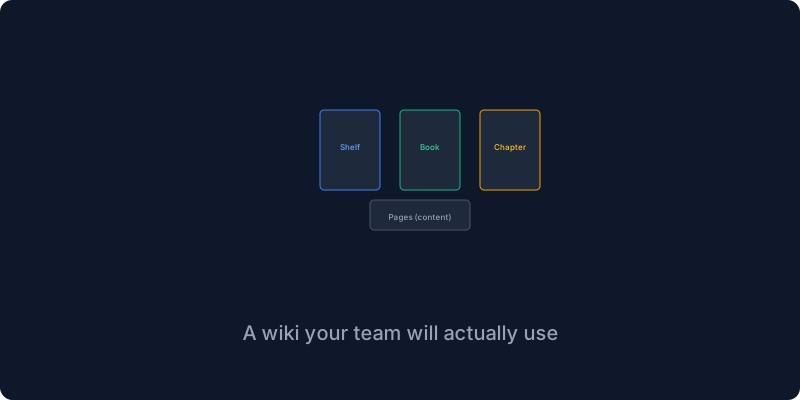
Content in BookStack is organized in a hierarchy of shelves containing books containing chapters containing pages. A shelf might be Engineering containing a Deployment Guide book with chapter on server setup and a chapter on configuration and a chapter on monitoring. Another shelf might be Operations containing a Server Inventory book and a Runbooks book. Another shelf might be Company containing a Policies book with chapters on security and onboarding.
LDAP and single sign-on support means your team can log in with their existing company credentials through LDAP or SAML or OAuth. I set this up with Authentik and now my team logs in without managing separate accounts for the wiki. This is critical for adoption because the fewer barriers to accessing documentation the more likely people are to use it.
The editor is intentionally simple with just bold and italic and headings and lists and tables and code blocks and images and links. No databases or formulas or complex page templates because if the editor were complex people would not use it. The simplicity means everyone on the team actually uses it including the non-technical people who found Confluence confusing.
The search feature searches page titles and content and even text inside attached PDFs if you enable it. Results show snippets of matching content so you can find what you need without opening every result. I use the search bar more than the navigation because it is faster to search for a term than to browse through the hierarchy.
BookStack is not the most sophisticated wiki but it is the one that actually gets used, and a wiki that gets used is infinitely better than the most powerful wiki that collects dust.
Give me your email and I will give you self hosting tips for your team.
Get New Articles
Weekly guides on self-hosting, privacy, and infrastructure.
No spam. Unsubscribe anytime.