This blog has covered three ways to reach a home server from outside, and each one left me with a footnote of doubt. Port forwarding works until you read a disclosure about a scanned router, Cloudflare Tunnel works beautifully until you sit with the knowledge that every byte to your own NAS transits one company that can inspect it and writes the terms it operates under, and a Headscale VPN works perfectly for me and nobody else, which stops working the day my partner needs one file or my cousin needs to see one dashboard. The gap in the middle is access that is per-person and per-service, auditable, and running on hardware nobody else controls.
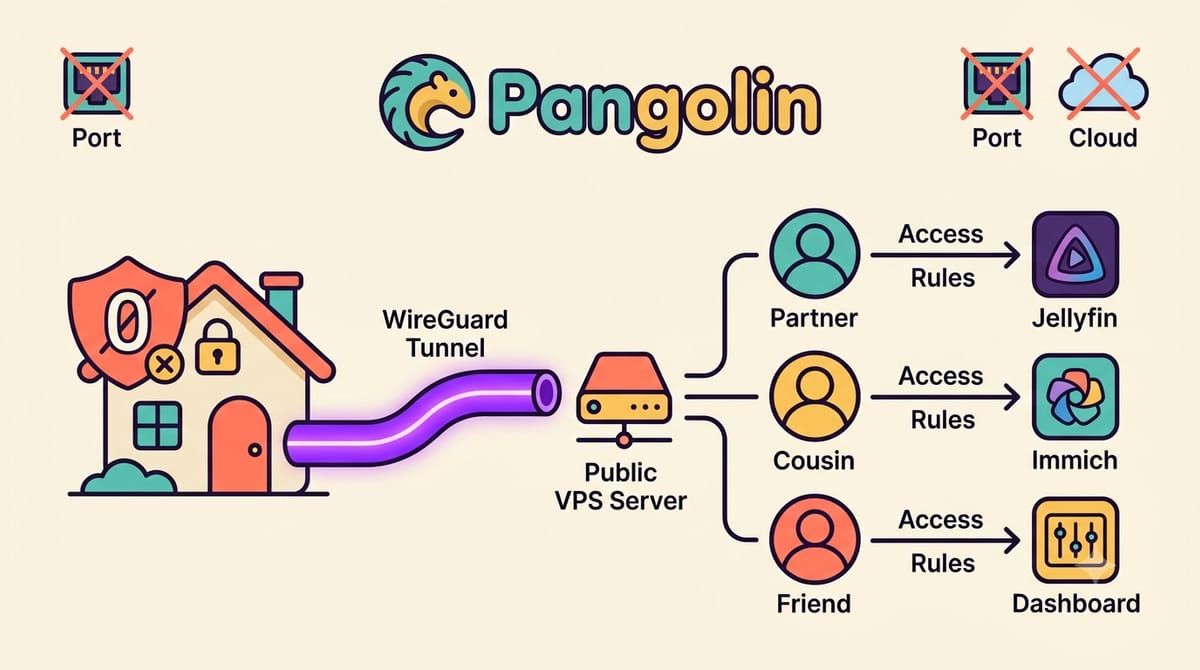
Pangolin fills exactly that gap, twenty-two thousand stars, open source under AGPL for the community edition, and the architecture is a tunneled reverse proxy, which is a mouthful that unpacks cleanly. A small VPS you rent runs Pangolin with its own Traefik and becomes the public front door with automatic SSL, your home server runs a tiny connector called Newt that dials out over WireGuard to that VPS, and because the connection is outbound, your home network opens zero ports and sits behind its firewall untouched, while requests that arrive at the VPS ride the tunnel inside to whichever service you mapped.
The install runs on a fresh Ubuntu or Debian VPS with a domain pointed at it, and the ports to open tell you the whole story, 80 and 443 for the web front door and 51820 UDP for the WireGuard tunnel and one more UDP port for clients.
curl -fsSL https://static.pangolin.net/get-installer.sh | bash
sudo ./installer
The installer asks for your base domain and a dashboard subdomain and an email for Let’s Encrypt, pulls three containers, Pangolin and Gerbil and Traefik, and wires them together, and the whole thing takes a few minutes after which the dashboard domain shows an initial setup page that wants a setup token from the Pangolin container logs, a detail that confused me for one loop around the logs before I found it, and then you create the admin account and the first organization and the door is open.
From there the model is resources, and thinking in resources is what makes Pangolin feel different from a VPN. You add a resource, say Jellyfin at some internal IP and port on your home network through the Newt site, give it the subdomain the outside world will use, and then decide who can reach it, because every resource has its own access rules, users and roles and email OTP and PIN codes and even geoblocking, so my partner gets Jellyfin and Immich and nothing else, my cousin gets one dashboard with a weekly PIN, and the audit log remembers every attempt, which is the kind of visibility a port forward has never offered anyone.
The features that pushed it from useful to impressive are the ones you would expect from a paid zero-trust product, single sign-on across all resources with its built-in identity or your own provider, so Authentik from the earlier post can become the source of truth, browser-based remote desktop and SSH where an RDP session or a terminal opens in a tab without any client installed, private resources like databases and whole subnets reachable only through their desktop or mobile client, and health alerts through ntfy when a site or resource goes down, which slots into my notification plumbing like everything else in this house.
The honest comparison with Cloudflare Tunnel, since that is the setup this blog described before, is cost and custody, the VPS is a few dollars a month against a generous free tier, and in exchange every byte between your browser and your home passes through a server you rent instead of a company whose larger business is traffic, with no upload size limits and no terms of service written for someone else’s use case. The trade is real, you are now the operator of the front door, patching the VPS and reading the release notes, and for my threat model that trade is the whole point.
My home router has had the same closed port list for months, the services answer from subdomains on a domain I own, and every visitor is a name in a log I control. The front door moved to a server I rent, and the house never noticed.
If your home network should answer only to you, subscribe to the newsletter.