Your First Reverse Proxy: Stop Using IP:Port Like a Caveman
troysk
May 15, 2026 · 3 min read
Every self-hoster reaches this point eventually. You have three services running, one on port 3001, one on 8096, one on 9000, and you remember them by sheer force of will, and when a friend asks for access you send them a URL with a colon and a port number and hope they do not judge you for living in 2005. There is a better way and it is called a reverse proxy, which sits in front of your services and routes traffic based on the domain name so that jellyfin.yourdomain.com goes to port 8096 and status.yourdomain.com goes to port 3001 without any ports in the URL and with automatic HTTPS.
There are many reverse proxies to choose from. Nginx is powerful but its configuration syntax has made me weep at my desk more than once. Traefik is great but its learning curve is nearly vertical and the documentation assumes you already understand the concepts. Caddy just works, with a simple configuration format called the Caddyfile that is almost readable as plain English, automatic HTTPS certificates from Let’s Encrypt, and HTTP slash two and three support out of the box. And it runs in a single Docker container.
The setup is a compose file with Caddy listening on ports 80 and 443, a volume for its configuration and another for its SSL certificate storage. The data volume stores your certificates and you should not delete it because if you do Caddy will hit Let’s Encrypt rate limits and your certificates will not renew for a week. I made this mistake twice.
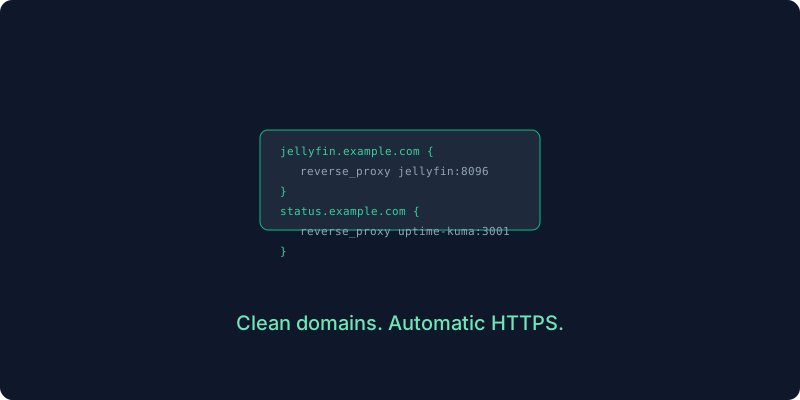
The Caddyfile is where the magic happens. You write each subdomain and the internal address of the service it should route to. No messing with SSL configuration or certbot or location blocks or any of the other complexity that comes with other proxies. Caddy reads this file, sees the domain names, and automatically provisions HTTPS certificates from Let’s Encrypt. The only prerequisite is that your domain’s DNS must point to your server’s IP with an A record for each subdomain.
jellyfin.yourdomain.com {
    reverse_proxy jellyfin:8096
}

status.yourdomain.com {
    reverse_proxy uptime-kuma:3001
}
The reverse proxy syntax only works if Caddy and your services are on the same Docker network. The easiest approach is to put everything in one compose file so they share a default network automatically, and then you do not need to expose any ports on your services because Caddy talks to them over Docker’s internal network. Your services are accessible via domain name but invisible to port scanners, which is a nice security bonus.
If you already have services running you do not need to recreate everything. You just add an external network to your Caddy compose file and connect your existing services to that same network so they can communicate. This is how I transitioned from the chaos of random ports to a proper domain-based setup without downtime.
A few things I learned the hard way. Use Let’s Encrypt staging certificates first while testing because if you misconfigure the domain the production endpoint will rate-limit you and you will be stuck waiting a week. The Caddy logs show you exactly what is happening during certificate provisioning so if something is not working the logs will tell you why. And Caddy reloads automatically when you change the Caddyfile so you do not need to restart the container every time you add a new service.
Once you have a reverse proxy everything changes. You stop thinking in ports and start thinking in domains. Your setup looks professional and sharing services becomes trivial and you never send someone a URL with a colon in it again. The first time I accessed jellyfin.yourdomain.com from my phone while on a train and watched a movie streaming from my closet server, I felt like I had achieved something that mattered.
Subscribe to the newsletter to keep getting similar posts about self-hosting infrastructure that actually works.
Get New Articles
Weekly guides on self-hosting, privacy, and infrastructure.
No spam. Unsubscribe anytime.